Is it true that Typing ‘Following Me’ in your Facebook Block List Will Not Show Your Followers? A viral message is spreading around Facebook that claims you can see who is following you by going in to your ‘Blocking‘ settings and typing ‘Following Me‘ in the ‘Block Users’ search bar.

This is a silly hoax like most messages that circulate wildly on Facebook. If you follow the directions in the post, all you are doing is searching profiles that have the words “following me” somewhere in their profile. That’s it. This is not a sneaky way to see who is following you.
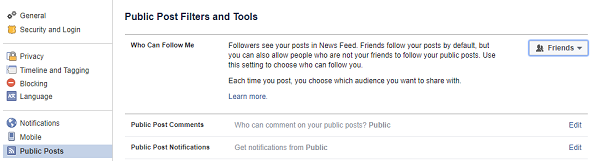
Facebook does allow you to have followers. Your friends follow your posts by default, but you can choose to let anyone follow your public posts. We highly recommend against doing this. You never know when a photo or post can come back to haunt you, and we generally recommend people lock down their profiles as much as possible.

If you have followed the craze and blocked a bunch of random Facebook users and had a mild freak out, you can relax a bit and know that a bunch of strangers haven’t been stalking your profile!

This is a silly hoax like most messages that circulate wildly on Facebook. If you follow the directions in the post, all you are doing is searching profiles that have the words “following me” somewhere in their profile. That’s it. This is not a sneaky way to see who is following you.
Facebook does allow you to have followers. Your friends follow your posts by default, but you can choose to let anyone follow your public posts. We highly recommend against doing this. You never know when a photo or post can come back to haunt you, and we generally recommend people lock down their profiles as much as possible.
Typing ‘Following Me’ in your Facebook Block List Will Not Show Your Followers
If you have followed the craze and blocked a bunch of random Facebook users and had a mild freak out, you can relax a bit and know that a bunch of strangers haven’t been stalking your profile!
2 comments
Write commentsIDK ... I typed it in and a list of 7 people showed up, and I'm not saying where they are from but I blocked them all. Can FB explain "WHY?" the names populate when you actually type in "following me" in the "Block users" box???
ReplyI'd rather be safe than sorry and block them.
I had over 30 "follower's" some I recognized from previous friends requests, others I have seen on other friends pages, but I blocked them all. The majority of them where foriegn accounts and new profiles, I wanted to see for myself, if maybe it was a scammer creep thing.
Reply